Refer to the following instructions to backup individual items within your Microsoft Exchange Server:
- OBM version 6.15.0.0 or above is installed on all Exchange node with Mailbox role.
- Login to the backup application's user interface.
- Select the [Backup Settings] button and the
 button to start the New Backup Set Wizard.
 - Create a MS Exchange mail level (DAG) backup set by selecting [MS Exchange Mail Level Backup] from the backup set type dropdown menu, then select the version of the Microsoft Exchange server to [Microsoft Exchange Server Database Available Group]
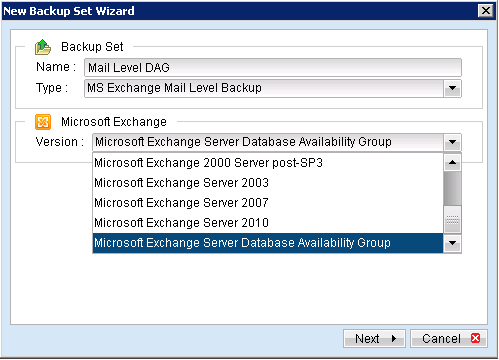
- Enter the backup set name
- Select [Next] to proceed.
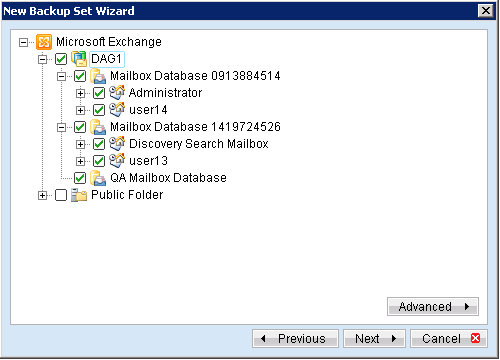
- Expand the Mailbox Store to select the corresponding mailboxes for backup.
- Configure a backup schedule for unattended backups (required).
- Select an encryption setting for your backup set.
- Press the [OK] button to complete the configuration of backup set.
- Scheduled backup will run automatically at the configured schedule time.
- Click [Save Settings] button on the OBM main screen to save the settings.
- On the next Exchange Server within the same DAG, open the OBM (RunOBC32.bat) and click on the same backup set.
- Make sure you have checked the checkbox of the "Run scheduled backup on this computer".
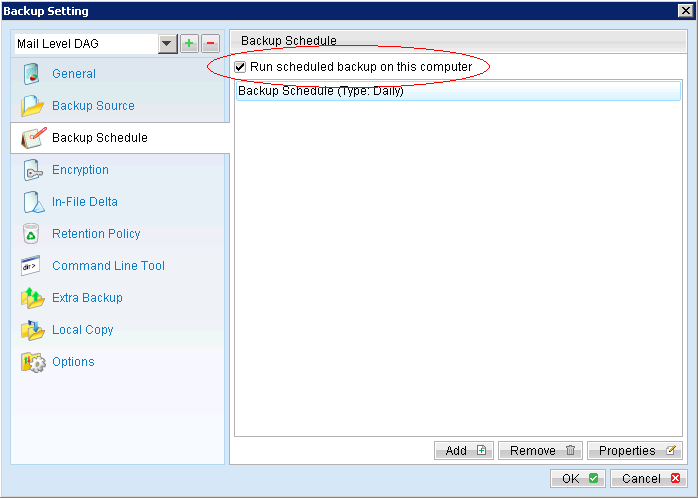
- Click the [Save Setting] button on the OBM main screen.
- Repeat step 13 until all the Exchange Servers within the same DAG have been configured to run the schedule backup.

For OBM installation on 64 bit machines, please start the backup application by running the RunOBC32.bat file found under the application installation bin directory: ${OBM-InstallHome}\bin\RunOBC32.bat (normally C:\Program Files\Backup Manager\bin\RunOBC32.bat
Note:
Since 6.11.0.0 , OBS/OBM supports multiple computers to backup on the same Exchange mail level DAG backup set.